4 Nov 2007

javascript implementation of a php/javascript/css/sql/perl and html editor

Codepress is a really nice html/javascript/php/perl/sql/java and css editor. It will display your code color coded (syntax highlighting) and can give you syntax completion features.

batch conversion from svg to png

I often need icons in different sizes as raster graphics. It seems to be easier to create/maintain these graphics as vector images and the convert them in all needed sizes as raster images.

Formats
I have decided to use svg as vector format. It can be conveniently and freely be edited with inkscape. The output format is svg because I need these images in web pages. png does offer transparent gradients (in contrast to gif, which only allows one indexed color to be transparent). Internet explorer does not handle png transparency by default, you must use a filter. Dean edwards' /IE7/ remove many quirks from ie6 and lower by using clever js and css tricks. alpha transparency for png can also be enabled with /IE7/.


Batch conversion
I have been using the ImageMagick command line utilites for scripted image manipulation with a lot of joy. Unfortunately ImageMagick is only capable of manipulating raster graphics. Fortunately, though, inkscape comes with a quiet hand command line interface to get this job done. inkscape can export svg images in various png sizes (and loads more).

Example

inkscape --without-gui --file=lib/icons/scalable/apps/calc.svg \
--export-png=calc.png --export-width=48 \
--export-height=48 && eog calc.png


This command will convert an svg image (lib/icons/scalable/apps/calc.svg) into a png image (calc.png) with a size of 48*48 pixels. Wehn the conversion comamnd (inkscape) succeeds, the result is dispalyed in gnomes image viewer ( eoc calc.png).

for converting a directory structure to different sizes of png sets, I have used the following script:
#!/usr/bin/env bash

# abort if we don't have a lib directory
if [[ ! -d lib/ ]]; then
echo "Must be run from the application's main directory."
exit 1;
fi

# config
TARGET=lib/stockitems
SIZES="12 16 24 32 48 72 96";
FILES=`find ./lib/icons/scalable -name "*.svg"`;

# purge target dir
if [[ -d "$TARGET" ]]; then
rm -R "$TARGET";
fi
mkdir "$TARGET";

# convert all files to the $SIZES dimensions
for size in $SIZES; do
echo $size;
for file in $FILES; do
target="$TARGET/${size}x$size/"`echo $file | sed -e \
's/^\.\/lib\/icons\/scalable\///; s/svg$/png/'`;
parent=`dirname $target`;
if [[ ! -d "$parent" ]]; then mkdir -p "$parent"; fi
inkscape --without-gui --file=$file --export-png=$target \
--export-width=$size --export-height=$size;
done
done

exit 0;

1 Nov 2007

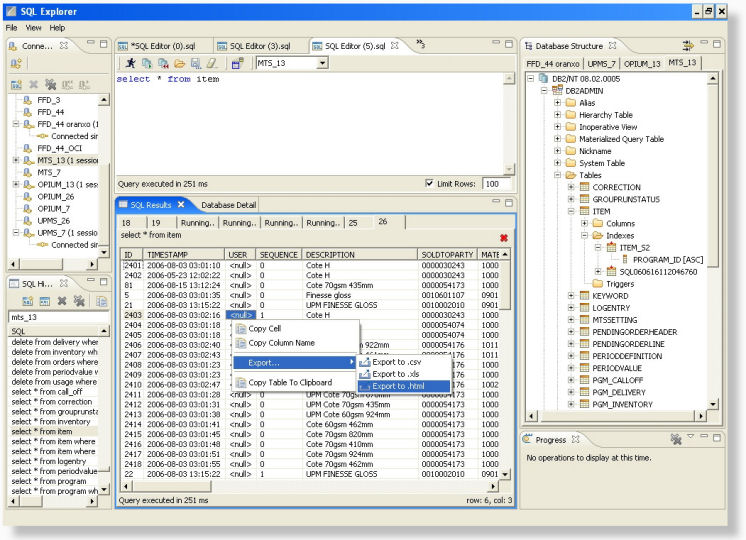
eclipse and database management

I just stumbled over a usefull Database browser and query editor called Eclipse SQL Explorer.

Installation does not work from within eclipse. I couldn't add the provided channel and had to download the zip file then extracted it in the eclipse directory.


Drivers


Drivers don't ship withthe tool. these must first be fetched maually or every product.

Fortunately SUN has a list of available JDBC Drivers which helps to find (mostly commercial) drivers. Open Drivers I have used:

28 Oct 2007

phpeclips, after install hickups.

Class Browser

PHPeclipse is a really nice ide for working on php projects. I have started to use PHPeclipse as my main development editor. It offers so much convenience, like the built in class tree (AKA Outline).

Outline displays a lot of information about your classes. It gives a good overview about visibility (public, protected, private) and also lets you know if a method is abstract, final or if it is an interface. Furthermore, the versioning system status is displayed (CVS/SVN and probably more) for class methods, constants and properties.

Source Control

The Synchronizing Perspective gives great control of the currently edited files. Easy and accessible diffs and tree views of changed files.

The source control features will also integrate cvs/svn blame into the current view. the gutter will be colored in defferent colors (by version) and when you hover over the gutter with the mouse you can see the commit comment, date, etc.

These are the strengths of PHPeclipse after the first impression. But there where some hickups after the first couple of editing sessions:

Color coding for html/xml files


by default, phpeclipse in version 3.2.x does not colorcode html/xml files. This is really needed for php web development. The eclipse Web Tools Platform (WTP) will add the needed features. It has proven (once more) to be very convenient/bulletproof to use the internal eclipse installer to install this features. So i have started eclipse as root user (this is on a debian linux system):

sudo eclipse

Then open "Help » Software Updates » Find and Install ...", select the "Search for new Features to install" radiobutton and click "Next >".


Select the Callisto Discovery site:


Make sure to "Automatically select mirrors" checkbox is active and click "Finish".

On the next dialog I did select "Web and J2EE Development" and did select (and this is important) click on the [Select Required] button to select all dependencies.


This worked for me on ubuntu feisty and debian etch.

Opening class declarations and properties

This did not work after I had created my first php project. I did check it out from an svn repository. Some of my class and functions names were unknown to phpeclipse, altough the include path was correct. I have found out that i need to add some information to the workspace's .project file. Open your project file (it might look different to the example below) and make sure the red lines are in your file.

This forum post describes how you can fix your project.

27 Oct 2007

migrating vom cvs to svn

cvs is a simple and robust versioning system. I have been using it for a long time and was quiet happy. Due to familiarity with cvs I have not considered changing to another system but some things are very annoying in cvs (renaming directories, tags or branches - anyone?).

Svn looks very promising because it uses a very similar interface compared to cvs, great! It seems to be faster, more flexible but still remains the simplicity of cvs. Also, there is broad support for svn in other applications such as eclipse, nautilus, kdevelop (to name a few) and bindings to many programming languages. Furthermore, there are conversion scripts to automagically convert cvs repos into svn repos.

Installation
As always, this instructions should work on a debian system (such as ubuntu, or debian etch).

sudo apt-get install -y subversion cvs2svn
(Optional packages)

Converting your CVS repository to SVN
The svn site has good interesting howto on how to use svn for a cvs user. This post will just cover the absolutely minimum to get you started.

Create a repository:
svnadmin create /usr/local/repos
Then import the old cvs repository:
cvs2svn --existing-svnrepos -s /home/svn/ /home/cvs/
That's it. your CVS Repository is now migrated.

Checking out your project
svn checkout file:///home/svn/trunk/parser /tmp/parser
Assuming your path to the repo is /home/svn and the module you want to checkout is called parser and the target directory is /tmp/parser you can checkout with the above command.

Nautilus integration
sudo apt-get install -y nautilus-script-collection-svn
To activate the subversion menu in nautilus, you must run this command manually:
nautilus-script-manager enable Subversion
Then restart nautilus. That's all folks. Have fun.

26 Oct 2007

phpeclipse on ubuntu

First of all; I have finally found a feature rich, cross platform php development environment (IDE). phpEclipse is a great tool and has matured to a quiet stable platform. However, due to utilization of eclipse it can also be (although extremely configurable) quiet complicated to setup.

Here are some installation instructions and problems I have experienced while using phpeclipse on ubuntu feisty.

Installation of java and eclipse

The installation of phpeclipse is fully covered by debian's package manager and eclipse (for the phpeclipse extension). First of all, Install eclipse itself:

sudo apt-get install -y eclipse
The eclipse package will install gcj (a free -as in freedom- java implementation, the GNU Compiler for Java) but phpeclipse will crash if you are using the default jre. You need sun's implementation of java. You must activate the multiverse repository in Ubuntu to make it available to the various package managers. Fortunately ubuntu feisty ships with sun's java implementation. The newest version is sun's java 6 (jre 1.6). I have experienced strange "Computing hasChildren" errors while running a php script in the eclipse debugger. Sun's java jre 1.5 solved the problem.

install it:
sudo apt-get install -y sun-java5-bin
after that, you must make sure that eclipse is using the newly installed jvm. You can set the order of used jvm's for eclipse eighter in /etc/eclipse/java_home or in ~/.eclipse/eclipserc (if you want to use your personal jre).
sudo gedit /etc/eclipse/java_home
make sure you add the line '/usr/lib/jvm/java-1.5.0-sun' on top of all entries. My /etc/eclipse/java_home looks like this:
# This file determines the search order the Eclipse Platform uses to find a
# compatible JAVA_HOME. This setting may be overridden on a per-user basis by
# altering the JAVA_HOME setting in ~/.eclipse/eclipserc.

/usr/lib/jvm/java-1.5.0-sun
/usr/lib/jvm/java-6-sun
/usr/lib/jvm/java-gcj
/usr/lib/kaffe/pthreads
/usr/lib/j2se/1.5
/usr/lib/j2se/1.4
/usr/lib/j2sdk1.5-ibm
/usr/lib/j2sdk1.4-ibm
/usr/lib/j2sdk1.5-sun
/usr/lib/j2sdk1.4-sun
phpeclipse update

The easiest and safest way to install phpeclipse in ubuntu is to use the eclipse update manager. First of all, make sure to run the latest version of eclipse itself. Select "Help » Software Install » Find and Install" from the menu:


Search for updates of already installed software. Make sure to up your eclipse (and installed features) to the latest stable version (or snapshot if you are keen, don't email me). In my case, I have updated to version 3.2.2.

You should now have the latest and greatest of eclipse, but no php support yet.

phpeclipse installation

you can also use eclipses update mechanism to install new features. You just need to add a new software repository to install a new feature and future updates.

Open "Help » Software Install » Find and Install" from the menu. Then select "Search for new features to install".


Click "Next »" and add a new repository by clicking "New remote site ...". The use one of the following repositories:

Stable
http://phpeclipse.sourceforge.net/update/releases

Unstable (if you are keen)
http://phpeclipse.sourceforge.net/update/nightly


Click Ok, select the repo and click "Finish".


This should install all phpEclipse components.

Running phpeclipse.

The first time you start up eclipse, you will see a java perspective. A perspective defines how your environment looks like. The java view will not offer you the information you want. Click on the "open Perspective" icon and select "Other" and then "PHP". If eclipse crashes these settings will probably not be stored, so an eclipse restart is recommended.

Then it is time to import projects into your workspace. First fo all, create a new php project. Right click the "Navigator" and select "New » PHP Project".


Php web scripts can be imported with right clicking the "Navigator" and the selecting "New » Folder". Make sure to link this folder to an NFS or Samba (or Windows) share.


Make sure to check the "Advanced »" Tab and the enter the path of the linked directory. That way, eclipse will not hold a copy of the files but will just link to your project. this is handy to use already existing projects.

Once you have imported the directory, you should be able to edit php files, see the class three and navigate to include files. Debugging scripts via http seems to be called; debugging remote scripts. Although they can be served via localhost. As far as I have seen, it is hard to get the settings right. It seems to be able to get the configuration to work for localhost debugging. It does not seem to be working (as of eclipse 3.22 and phpeclipse 1.8) for actual remote debugging (eg. your php script is run on an remote server with php_dbg.so enabled).

Serverside setup

Serverside means apache and php on localhost here, since I did not get it working for remote sites yet. install the php debugger extension from dd.cron.ru. If run from localhost you should be able to get debugging working with sun's java 1.5 jvm.

13 Jul 2007

Xaraya - identify modules

For the past 1-2 years I have been pretty much absent from Xaraya development, although still keeping half an eye on it.

Currently I am working with Xaraya again. I am pleased to see, that the 1.1.x versions have gained much stability.

While getting into it again, I have been fiddeling wirh module initializations and creating a skeleton for a new module. During this task, it would have been helpful to have a tool to find certain modules by id (I had dependecy errors pointing to module ids).

Scripts mentioned below require sh, grep, sed. Tested in a GNU Environment.

The following script can be used to identify xaraya modules by id (returns the module's name):

#!/bin/sh
modid="";
path="modules/";

usage() {
echo "modname [path]";
}

# check for module directory
if [[ $# -lt 2 ]]; then
usage;
exit 1;
fi
modid="$1";

if [[ ! -z "$2" ]]; then
path="$2";
fi

if [[ ! -d "$path" ]]; then
echo "Directory '$path' not found."
echo ""
usage;
exit 2;
fi

res=`grep -H "'id'" $path*/xarversion.php | grep $modid`;

echo "$res" | sed -e 's/\/xarversion.*$//; s/.*\///' -

exit 0;


And if you want to identify a module by name (get id) use this:
#!/bin/sh
modname="";
path="modules/";

usage() {
echo "modid [path]";
}

# check for module directory
if [[ $# -lt 2 ]]; then
usage;
exit 1;
fi
modname="$1";

if [[ ! -z "$2" ]]; then
path="$2";
fi

if [[ ! -d "$path" ]]; then
echo "Directory '$path' not found."
echo ""
usage;
exit 2;
fi

cat $path/$modname/xarversion.php | grep "'id'" | sed -e 's/^[^0-9]*\([0-9]\+\)[^0-9]*/\1/'

exit 0;

6 Jun 2007

Firestarter, gnome-network-manager and 2 interfaces.

After a successful upgrade of my Desktop PCs from Eddy to Ubuntu Feisty Fawn it was time to upgrade my Laptop. Open Source Operating Systems on Laptops have always been a bit troublesome for me, due to the nature of exotic hardware components in many Laptops.

Because it was upgraded a couple of time already, I decided to do a fresh install. a fresh installation took about 15-20 minutes (and this is a 3 year old laptop). While on a nearly virgin system (i took my home partition over, so many gnome configs were migrated) I decided to solve a long standing problem on this machine; network configuration.

This Laptop (like most) has 2 Network interfaces, a gigabit ethernet NIC and a wireless NIC. I am almost always only using one interface at a time. Therefore I have become accustomed to firestarter and gnome-network-manager.

Firestarter is a simple firewall UI (and daemon) which is pretty handy if you do not have special firewalling needs. And gnome-network-manager is a daemon which tries to keep up your network conection whenever possible. Both tools offer a gnome try icon for easy access and up to date infos of the status of each (connectivity, firewall events).


(1st from left, network-manager, 3rd Firestarter)

The problem with this combo is, that firestarter can only manage 1 Interface at a time. Whenever switching to another interface, firestarter's config has to be adjusted. Fortunately firestarter's configuration is (as expected) a plain text file in /etc. Debian's interface configuration config allows scripts to be executed and many stages during interface initialisation and shutdown. With a little sed, this problem could be solved as follows.

Copy this script to /etc/network/firestarter. It will start/stop and reconfigure firestarter whenever an interface is brought up or down.

#!/bin/bash
# Description: Remove routes to allow communication between machines which

if [[ "$IFACE" != "eth0" && "$IFACE" != "eth1" ]]; then
exit 0
fi

export PATH=/sbin:/bin:/usr/bin:$PATH;

#echo "firewall configuration ... $PHASE";

firestarter_init="/etc/init.d/firestarter";
fs_config="/etc/firestarter/configuration";
fs_config_tmp="/tmp/firestarter.conf";

# reconfigure firestarter's interface
function reconfigure_firestarter {
#echo "reconfiguring firestarter for $1 ...";
cat $fs_config | \
sed -e 's/IF=.*/IF="'$1'"/;s/INIF=.*/INIF="'$1'"/' > $fs_config_tmp && \
mv $fs_config_tmp $fs_config && \
chmod 440 $fs_config;
}

if [[ "$MODE" = "start" ]] ; then
reconfigure_firestarter $IFACE;
#echo "starting firestarter for interface $IFACE ...";
$firestarter_init start 2>&1 >/dev/null
#echo "fsstart";
exit 0;
fi
if [[ "$MODE" = "stop" ]] ; then
#echo "stopping firestarter for interface $IFACE ...";
$firestarter_init stop 2>&1 >/dev/null
#echo "fsstop";
exit 0;
fi

exit 1;

Then make sure all interfaces of concern are configured to use the firestarter configuration script. My /etc/network/interfaces looks like this:

auto eth0
iface eth0 inet dhcp
post-up /etc/network/firestarter
pre-down /etc/network/firestarter
auto eth1
iface eth1 inet dhcp
wireless-essid wundinet
post-up /etc/network/firestarter pre-down /etc/network/firestarter

That's it.

2 Jun 2007

Automaticly suspend VMWare virtual machines on shutdown

I am using the VMWare Server on my workstation for testing. Because this computer has the fast nVidia card installed, I also boot in to windows now and then for gaming. It sometimes happens that I do forget to shutdown or suspend the VMs which is not really good for the virtual machines.

Fortunately, the VMWare server on linux comes with a handy command line client (vmware-cmd) for manipulating the configured virtual machines. This done from a System V init script solved my problem: suspending all running vms on shutdown and resuming them on start up. The solution works only if you are using vms with the VMware Tools installed. Three steps are needed to set up such a scripted solution on debian linux.

VMWare Tools
For no apparent reason vmware-cmd insists in having vmware tools installed in the vm or will refuse to work (the vmware-server-console can suspend clients without vmware tools installed). So you must make sure that auto suspended clients have the VMWare tools installed.

init script
Install the init script below in /etc/init.d and create the needed links. Both steps may vary a little depending on your distro (examples are for debian/ubuntu).

Create start/stop links
Make sure the start part of the script is run after vmware is started and the stop part must be called before vmware is suspended.

cd /etc/rc2
sudo ln -s /etc/init.d/vmware-suspend S21vmware-resume
sudo ln -s /etc/init.d/vmware-suspend K19vmware-suspend
/etc/rc2.d should look lik this now:

ls -la /etc/rc2.d/*vmware*
lrwxrwxrwx 1 root root 26 2007-06-02 13:29 /etc/rc2.d/K19vmware-suspend -> /etc/init.d/vmware-suspend
lrwxrwxrwx 1 root root 23 2007-05-31 13:58 /etc/rc2.d/S20vmware-server -> ../init.d/vmware-server
lrwxrwxrwx 1 root root 26 2007-06-02 13:28 /etc/rc2.d/S21vmware-resume -> /etc/init.d/vmware-suspend

That's it.

/etc/init.d/vmware-suspend
#!/bin/bash
# $Id$

# store cfg file names of automaticly suspended vms in this file, so we
# can auto resume on the next start.
STATE=/var/run/vmware.suspended;

# this function suspends running vms.
function vmware_suspend {
running="";
for vm in `vmware-cmd -l`; do
state="`vmware-cmd \"$vm\" getstate | grep on`";
if [[ ! -z "$state" ]]; then
running=`echo -e "$running\n$vm"`;
echo "Suspending vm: $vm";
vmware-cmd "$vm" suspend;
fi
done
echo "$running" > "$STATE";
}

# resume suspended vms.
function vmware_resume {
if [[ -f "$STATE" ]]; then
for vm in `cat "$STATE"`; do
echo "Resuming vm: $vm";
vmware-cmd "$vm" start;
done
rm "$STATE";
fi
}

case "$1" in
start)
echo "Starting";
vmware_resume;;
stop)
echo "Stopping";
vmware_suspend;;
esac

exit 0;

1 Jun 2007

Patent claims and Microsoft's Opensource Initiative

According to eWeek, microsoft does not see a contradiction between the recent IP threats agains Linux and OpenSource Software and their own Open Source Initiative.

Silent Hunter 4 - Wolfes of the Pacific

Ok some more details about the game. Here is a list of pros/cons if you consider buying it:

Pros

  • very realistic graphics - highly detailed graphics, even the crews of destroyers and battleships walk on the ships.
  • crew management - you can assign crew members to vital positions or replace injured crew members.
  • many playable ships - altough most of them "feel" the same (might be my lack of understanding/experience)
  • interesting dynamic mission builder for online missions (will create random formations at random places in the pacific)
  • navigation tools - on the map you have a pencil, a ruler and a circle which help marking spotted ship's paths. This could be done by the program but adds some more realism to the game.
Cons
  • bad quality - patch 1.2 was released not so long ago and there are still many vital bugs which should be fixed. ubi has not yet made a statement if there wll be a patch 1.3
  • missing online game lobby - it is possible to join online games trough the built in ubi lobby. The problem is that no chat is available nor a list of connected players. Usually there are zero servers waiting for players, thus many players think it does not work.
  • The campaign is somewhat boring after some time. The missions are automaticly generated, however it happend to me that I had to play the same mission over and over again (maybe 30 times) then I quit the career.

Germany outlaws computer security

Well, the headline may be a bit provocative, I admit.

The German "Bundestag" has passed a new law to outlaw "hacker tools" against critics from experts. Needless to say, that many software programs can be used in a creative way to "hack" another computer system. Think of using a Webbrowser (Internet Explorer or Firefox) to place an XSS (cross site scripting) attack on a vulnerable system. Is the browser now considered a hacking tool? This new law is extremely questionable also, because security experts use exactly the same tools to secure their networks as a hacker would use for attacking a target (or at least preparing an attack).

I wonder what this means to all those Open Source Operating Systems shipping security tools like nmap, etherreal, netcat and the such. Hence, even ping could be considered a hacking tool! To stretch this a little bit further, every owner of a compiler could build his own "hacking tools".

Outlaw guns and only outlaws will own guns.

This new law was covered by the CCC (Chaos Computer Club), here is an english translation.

31 May 2007

Silent Hunter 4 » Saipan mission

Recently I have bought Silent Hunter 4, a submarine simulator for Windows XP. It is the 4th version of an old sequel (when I was a kid I used to play Silent hunter 1).

Graphics are pretty detailed, the game is nice to play. Unfortunately the game has no real game lobby (no chat and many players complain that they cannot host games).

Here some screenshots:


Internet Explorer Screenshot service

Web developers are struggling every day to make that website or user interface compatible with as many browsers as possible.

There are standards (I hear you say). Yes, there are! W3C is a consortium which defines recommendations. However, these recommendations are sometimes vague and most often do not cover innovative/new ideas (standards are often defined after a new technology is already in use). Therefore, browser's rendering engine's output will vary and must be tested by developers.

On windows, it is not possible to install more than one Internet Explorer version, because newer versions tend to replace older versions (IIRC it was possible to install IE4 and IE5 on the same box). This is a problem for web developers (designers and programmers) because there is often a need to support more than one version (making sure the current project works in the most used environment as well as in future/older browsers).

Linux, wine and ies4linux come in handy in this situation. combined with Xvfb and some standard *nix tools (like ImageMagick and WindowMaker) make it possible to create a web service for capturing screenshots of sites in IE 5, 5.5, 6 and 7.

Currently I am working on a appliance (VMWare image) as well as a howto on how to do this.