17 Jul 2009

ies4linux on Ubuntu Jaunty

Installing ies4linux on Jaunty is not so straight forward. I have only managed to install IE6 and flash so far (IE1 - IE7 would be available in the same package).

First of all, wine and cabextract are needed:
$ sudo apt-get install -y wine cabextract

then download the ies4 linux package:

cd /tmp
wget http://www.tatanka.com.br/ies4linux/downloads/ies4linux-latest.tar.gz
tar zxvf ies4linux-latest.tar.gz
cd ies4linux-*


The version check of wine is looking for re/0\.9\.*/ but wine hited version 1.* some weeks ago, this version check doesn't work, I have disabled it since we are using defenately a newer version. Edit «lib/functions.sh» and comment out the line with wine version check (~ line 36):
--- lib/functions.sh-dist 2009-07-17 17:39:55.283279400 +0200
+++ lib/functions.sh 2009-07-17 17:39:59.917574880 +0200
@@ -33,7 +33,7 @@
# Find where wine is
function find_wine {
which wine &> /dev/null || error $MSG_ERROR_INSTALL_WINE
- wine --version 2>&1 | grep -q "0.9." || warning $MSG_WARNING_OLDWINE
+ # wine --version 2>&1 | grep -q "0.9." || warning $MSG_WARNING_OLDWINE
}

# check for cabextract


Now the installer should work and you can install ies4linux (ie6 + flash + msfonts) to your $HOME directory:

./ies4linux  \
--basedir ~/ies4linux --bindir ~/bin \
--no-desktop-icon --install-corefonts --no-gui


The «--help» and «--full-help» command line arguments do not expose all commandline parameters. All options can be found in the ./ies4linux shell script:
# Get command-line options
while [ $# -gt 0 ]; do
case "$1" in
--install-ie6 | --install-flash) shift;;
--install-ie55) export INSTALLIE55=1; shift ;;
--install-ie5) export INSTALLIE5=1; shift ;;
--install-ie2) export INSTALLIE2=1; shift ;;
--install-ie15) export INSTALLIE15=1; shift ;;
--install-ie1) export INSTALLIE1=1; shift ;;

--install-ie7|--beta-install-ie7) export INSTALLIE7=1; shift ;;
--hack-ie7-proxy-settings) export HACK_IE7_PROXY=1; shift ;;

--no-ie6) export INSTALLIE6=0; shift ;;
--no-flash) export INSTALLFLASH=0; shift ;;
--no-desktop-icon) export CREATE_DESKTOP_ICON=0; shift ;;
--no-menu-icon) export CREATE_MENU_ICON=0; shift ;;
--install-corefonts) export INSTALLCOREFONTS=1; shift ;;

--basedir) export BASEDIR="$2"; shift 2 ;;
--bindir) export BINDIR="$2"; shift 2 ;;
--downloaddir) export DOWNLOADDIR="$2"; changeddownloaddir=1; shift 2 ;;
--wget-flags) export WGETFLAGS="$2"; shift 2 ;;

--no-gui) export IES4LINUX_MODE="automatic"; shift ;;
--no-color) export NOCOLOR=1; shift 1 ;;
--gui) export PREFERRED_GUI=$2; shift 2 ;;
--no-localization)
eval $(load_variables_file "$IES4LINUX/lang/enUS.sh")
shift
;;

--uninstall)
uninstall
exit 0
;;
--locale)
export CHOOSED_IE6_LOCALE=$(echo "$2" | tr a-z A-Z)
shift 2
;;
--list-locales)
echo $IE6_LOCALES | fmt -w 40
exit 0
;;
--debug)
export DEBUG=true
shift
;;
--help | -h)
sh lib/help.sh
exit 0
;;
--full-help)
sh lib/help.sh full
exit 0
;;
*)
echo "Error: unknown option \"$1\""
if echo "$1" | grep '=' >/dev/null; then
echo "Options are not GNU-style"
echo " i.e. don't use: --option=value"
echo " use instead: --option value"
fi
echo "run \"./ies4linux --help\" for more info"
exit 1
;;
esac
done

Ubuntu Jaunty and LSB (Linux Standard Base)

I can't believe it but it's true, LSB is not part of the Jaunty default installation *sigh*

the following command works so nicely if one wants to detect the linux version a script is running on:
$ echo $(lsb_release -rcsi)

but without LSB the command won't work. I am a little bit surprised that it is not common among all linux releases to include LSB (except for the ones going for small footprint like DSL).

Install LSB on jaunty with:

$ sudo apt-get install -y lsb

10 Jul 2009

simplified deb package management

pkg shell script to the rescue. typing often used commands for software management on a debian based (deb) system can be boring an error prone. Some commands might be used often, such as «apt-get install», «apt-cache search» and «dpkg -l», etc. This script exposes the most used commands as easy to remebr commands (pkg* for package *i = install, *s = search, *u = update, etc.).

Modes:
pkgi [parameters] >name< Install package with >name<
pkgs [parameters] >name< Search for package >name<
pkgu Upgrade all packages
pkgl >name< List installed Packages filtered by >name<
pkgr [parameters] >name< Remove installed package
pkgp [parameters] >name< Purge installed package
pkgc Cleanup
pkg setup Setup symlinks
pkg remove|uninstall Remove symlinks

pkg (bash script):
#!/bin/bash

# shortcuts to frequently used package management tools like apt-get,
# dpkg and apt-cache
#
# NOTE: this script does not work if you havb spaces in your path.
#
# $Id$

# usage
function usage {
cat << EOT
usage: (pkgi|pkgs|pkgr|pkgp|pkgl|pkgu) [parameters] [name]

Modes:
pkgi [parameters] <name> Install package with <name>
pkgs [parameters] <name> Search for package <name>
pkgu Upgrade all packages
pkgl <name> List installed Packages filtered by <name>
pkgr [parameters] <name> Remove installed package
pkgp [parameters] <name> Purge installed package
pkgc Cleanup
pkg setup Setup symlinks
pkg remove|uninstall Remove symlinks
Mappings:
pkgi [parameters] <name> sudo apt-get install [parameters] <name>
pkgs [parameters] <name> apt-cache search [parameters] <name>
pkgu sudo apt-get update && sudo apt-get upgrade
pkgl <name> dpkg -l | grep <name>
pkgr [parameters] <name> sudo apt-get remove [parameters] <name>
pkgr [parameters] <name> sudo apt-get remove --purge [parameters] <name>
pkgc sudo apt-get autoremove
Exit Codes
0: success
1: unknown command (install, remove, autoclean, etc.)
2: parameter missing
3: no write permission (needed by setup)
EOT
}

function fn_help {
fn=$(basename $1)
echo -en "usage: $fn "

case $fn in
"pkgi")
echo "[parameters] <name> - Install package with <name>" ;;
"pkgu" )
echo "- Update repository" ;;
"pkgs" )
echo "[parameters] <name> - Search for package <name>" ;;
"pkgl" )
echo "<name> - List installed Packages filtered by <name>" ;;
"pkgr" )
echo "[parameters] <name> - Remove installed package " ;;
"pkgp" )
echo "[parameters] <name> - Purge installed package " ;;
"pkgc" )
echo "- Cleanup" ;;
* )
echo "Unknown program!"
exit 2
;;
esac
}

function remove {
for l in $@; do
p=$(basename $l)
if [[ "$p" == "pkg" ]]; then
continue
fi
rm $l
done

exit 0;
}

# parameters
filename=$(basename "$0");
command=""

if [[ "$filename" == "pkgi" ]]; then command="install"; fi
if [[ "$filename" == "pkgu" ]]; then command="upgrade"; fi
if [[ "$filename" == "pkgs" ]]; then command="search"; fi
if [[ "$filename" == "pkgl" ]]; then command="list"; fi
if [[ "$filename" == "pkgr" ]]; then command="remove"; fi
if [[ "$filename" == "pkgp" ]]; then command="purge"; fi
if [[ "$filename" == "pkgc" ]]; then command="autoremove"; fi

# setup ?
if [[ "$filename" == "pkg" ]]; then
basedir=$(dirname $0)
escaped=$(echo "$basedir" | sed -e 's/\//\\\//g')
pkgs=$(echo $basedir/pkg* | sed -e 's/'$escaped"\/pkg "'//')

if [[ "$1" == "remove" || "$1" == "uninstall" ]]; then
# if [[ $(basename $0) == "pkg" ]]; then
# exit 0;
# fi
#
echo "Removing ..."
remove $pkgs
fi

if [[ "$1" == "setup" ]]; then

# check if we can write to the directory to reate the symlinks
if [[ ! -w "$basedir" ]]; then
echo "No write permission to create symlinks in $basedir";
exit 2;
fi

echo "Installed links"
ls -la $pkgs;

echo
echo "Purging links"
if [[ $(basename $0) != "pkg" ]]; then
exit 0;
fi
# for l in $pkgs; do
# echo $l
# rm $l
# done

echo
echo "creating links"
for l in pkgc pkgi pkgl pkgr pkgp pkgs pkgu; do
echo $basedir/pkg "->" $basedir/$l
ln -s $basedir/pkg $basedir/$l
done
exit 0;
fi

if [[ -z "$1" || "$1" == "-h" || "$1" == "--help" ]]; then
usage;
exit 0;
fi
fi

# show help text ?
if [[ "$1" == "-h" || "$1" == "--help" ]]; then
fn_help "$0"
exit 0
fi

# show help if parameters are missing
if [[ "$filename" == "pkgi" || "$filename" == "pkgs" ||
"$filename" == "pkgr" || "$filename" == "pkg" ||
"$filename" == "pkgs" || "$filename" == "pkgp" ]]; then
if [[ -z "$1" ]]; then
fn_help "$0"
exit 2
fi
fi

# unknown command
if [[ -z "$command" ]]; then
fn_help "$0"
exit 1
fi

# execute
if [[ "$command" == "list" ]]; then
/usr/bin/dpkg -l | grep -v "^r" | \
sed -e 's/\(..\)[ \t]\+\([^ ]\+\)[ \t]\+\([^ ]\+\)[ \t]\+\(.*\)$/\2 - \4/'|\
grep "$1"
elif [[ "$command" == "search" ]]; then
/usr/bin/apt-cache search $@
elif [[ "$command" == "purge" ]]; then
sudo /usr/bin/apt-get remove --purge $@
elif [[ "$command" == "update" ]]; then
sudo /usr/bin/apt-get update $@ && sudo /usr/bin/apt-get upgrade $@
else
sudo /usr/bin/apt-get $command $@
fi

exit 0

12 May 2009

fsv 0.9 deb for Ubuntu 8.10 Interpid (x86)

This package will be built according to these values:

0 - Maintainer: [ root@splatter ]
1 - Summary: [ fsv (pronounced eff-ess-vee) is a file system visualizer in cyberspace. It lays out files and directories in three dimensions, geometrically representing the file system hierarchy to allow visual overview and analysis. fsv can visualize a modest home directory, a workstation's hard drive, or any arbitrarily large collection of files, limited only by the host computer's memory and graphics hardware. ]
2 - Name: [ fsv ]
3 - Version: [ 0.9 ]
4 - Release: [ 1 ]
5 - License: [ GPL ]
6 - Group: [ checkinstall ]
7 - Architecture: [ i386 ]
8 - Source location: [ fsv-0.9 ]
9 - Alternate source location: [ ]
10 - Requires: [ ]
11 - Provides: [ fsv ]


Make sure to install the following packages first:
$ sudo apt-get install -y gtkglarea5-dev libgtkgl2.0-dev libgtk1.2-dev

Download fsv 0.9 deb for Ubuntu x86 8.10 Interpid

8 Jan 2009

Django Project creation check list

1) (Optional) Create new Project: django-admin.py startproject projectname
2a) Add to Apache config (replace evreything within <>):

<Location "/<location>/">
SetHandler python-program
PythonHandler django.core.handlers.modpython
SetEnv DJANGO_SETTINGS_MODULE ikariam.settings

PythonDebug On # disable this on a production site!

PythonPath "['<path to project root>'] + sys.path"
</Location>
# media files
Alias /media "/usr/lib/python2.4/site-packages/django/contrib/admin/media"

2b) Optionally run the python webserver: python manage.py runserver 8080
3) settings.py: Set TIME_ZONE = 'Europe/Zurich' and LANGUAGE_CODE = 'de-CH'
4) settings.py: Set Database config
5) settings.py: Add project
INSTALLED_APPS = (
'mysite.books', # or
'mysite'
)


6) example Model:
# $Id$
#
# if not specified, primarykeys will be generated automatically. A field
# with the name `id` is added as auto increment field. So do not specifically
# declare primarykeys manually unless needed.
# http://docs.djangoproject.com/en/dev/topics/db/models/#automatic-primary-key-fields
from django.db import models

class Schedule(models.Model):
# id = models.AutoField(primary_key=True)
start = models.TimeField()
end = models.TimeField()
lastmod = models.DateTimeField(auto_now=True)
inserted = models.DateTimeField(auto_now_add=True)

def __unicode__(self):
return self.start + " - " + self.end

class Price(models.Model):
# id = models.AutoField(primary_key=True)
name = models.CharField(max_length=10)
description = models.CharField(max_length=250)
lastmod = models.DateTimeField(auto_now=True)
inserted = models.DateTimeField(auto_now_add=True)

def __unicode__(self):
return self.name

class Event(models.Model):
# id = models.AutoField(primary_key=True)
name = models.CharField(max_length=30)
start = models.DateField()
end = models.DateField()

schedule = models.ForeignKey(Schedule)
price = models.ForeignKey(Price)

lastmod = models.DateTimeField(auto_now=True)
inserted = models.DateTimeField(auto_now_add=True)

def __unicode__(self):
return self.name

class Meta:
# db_table = u'ana_event'
ordering = ["name"]
verbose_name = "Event"
verbose_name_plural = "Events"

class Admin:
pass
# list_display = ("name", "start", "end")
# search_fields = ('name',)
# list_filter = ('name')
# ordering = ('x', 'y')

7) Check db creation and create Database:
python manage.py validate # validate db structure
python manage.py sqlall projectname # show creation SQL
python manage.py syncdb # create Database

8) Install the admin application. Do this by adding "django.contrib.admin" to your INSTALLED_APPS setting.
INSTALLED_APPS = (
'django.contrib.auth',
'django.contrib.contenttypes',
'django.contrib.sessions',
'django.contrib.sites',
'django.contrib.admin',
'ana'
)

9) Install url redirector
from django.conf.urls.defaults import *

# Uncomment the next two lines to enable the admin:
from django.contrib import admin
admin.autodiscover()

urlpatterns = patterns('',
# Example:
# (r'^ana/', include('ana.foo.urls')),

# Uncomment the admin/doc line below and add 'django.contrib.admindocs'
# to INSTALLED_APPS to enable admin documentation:
# (r'^admin/doc/', include('django.contrib.admindocs.urls')),

# Uncomment the next line to enable the admin:
# (r'admin/$', include('django.contrib.admin.urls')),
(r'^ana/admin/(.*)$', admin.site.root),
)

10) Write an aemin definition for the objects
from ana.models import Event
from django.contrib import admin

class EventAdmin(admin.ModelAdmin):
# fieldsets = [
# (None, {'fields': ['question']}),
# ('Date information', {'fields': ['pub_date'], 'classes': ['collapse']}),
# ]

# display these fields in the listing
list_display = ("name", "start", "end")

# add filter to the right of a listing
#list_filter = ['name']

# Let's add some search capability:
search_fields = ['name']

# Finally, because Poll objects have dates, it'd be convenient
# to be able to drill down by date. Add this line:
# date_hierarchy = 'pub_date'

# liste verkleinern
# def queryset(self, request):
# return self.model._default_manager.filter(ocean=0)

admin.site.register(Event, EventAdmin)

6 Jan 2009

Django

As everyone I became infected by Python lately. Django seems to be a nice web development framework which eases the pain of everyday tasks quiet nicely.

Luckily «The Django Book» is freely available in HTML. However, I hate going through the TOC over and over again, an RSS Feed in Firefox's Bookmark toolbar saves me 1-2 clicks for every lookup.


Here ist the TOC RSS.

17 Mar 2008

Ikariam, IkaTrader

i have written some greasemonkey scripts for ikariam.de. These help to get a better overview for trading: listing incoming ships, linsting all your ships (in-/outbound).

These scripts are written for firefox 2 utilizing the greasemonkey etxtension.

More about the features and downloads for IkaTrader.

16 Feb 2008

Ikariam grease monkey scripts

Autologin grease monkey script for Ikariam:

// ==UserScript==
// @name IkariamAutologin2
// @namespace Ikariam
// @include http://ikariam.de/
// ==/UserScript==

var SERVER = "s5.ikariam.de"; //Nur die Zahl verändern s1 = alpha, s2 = beta
var USERNAME = "username"; //Hier deinen Username eintragen
var PASSWORD = "password"; //Hier dein Passwort eintragen


document.getElementById("universe").value = SERVER;
document.getElementById("login").value = USERNAME;
document.getElementById("pwd").value = PASSWORD;

var url = "http://" + document.getElementById("universe").value + "/index.php?action=loginAvatar&function=login";

document.getElementById('loginForm').action = url;
document.getElementById("loginForm").submit();

7 Feb 2008

php5 beauty, reflection api

the php4 way

beside very usefull features like try/catch php5 has many little nifty features. i had to fetch all methods of a class, regardless of visibility. get_class_methods(mixed $class_name) has been introduced in php4 and is only able to get public methods. I needed a way to list protected/private methods of a class (without the need of executing them).

Reflection API
The reflection api (intreduced in php5) is a much more flexible way to find out information about a class, object, methods, properties, etc.

PHP5 Reflection API Documentation

List all methods of a class (public, private, protected, final, static):

<?php
$r = new ReflectionClass('Exception');
print_r($r->getMethods());
?>

26 Jan 2008

ivtv scanner and tuner

with my new pvr-150 from hauppauge i was wondering how to scan for channels.

it seems quiet simple:

echo "" > channels; 
c=0;
while [[ $c -lt 255 ]]; do
ivtv-tune -c $c | grep "Detected" | awk '{print $2"\t"'$c'}';
c=`expr $c + 1`;
done >> channels & \
tail -f channels

The above scanner scans by channel, this is not optimal if you are living in a not-so-well-known region and you have a brain dead tv provider which doesn't make the frequency table available online (like eblcom.ch a subsidary of cablecom).

the example below will scan by frequency rather than by channel:
#!/bin/bash

## begin config
start="170.000"; # float, must provide 3 decimal digits
end="1000.000"; # float, must provide 3 decimal digits
step="250"; # int, seps by thousands
file="channel.txt";
## end config

c=`echo $start \* 1000 | bc | sed -e 's/\.000//'`;
end=`echo $end \* 1000 | bc | sed -e 's/\.000//'`;
detected=0;
fstart=0;
fend=0;
last=0;

channel=0;

while [ $c -lt $end ]; do
freq=`echo "$c" | sed -e 's/\([0-9]\{3\}\)$/.\1/'`;
# echo "$c | $freq";
r=`ivtv-tune -f $freq | grep Detected`;
c=`echo "$c + 250" | bc`;

if [[ $detected == 0 ]]; then
if [[ -n "$r" ]]; then
fstart=$freq;
detected=1;
fi
else
if [[ -z "$r" ]]; then
fend=$last;
detected=0;

#echo "scale=3; ($fend - $fstart) / 2 + $fstart";
med=`echo "scale=3; ($fend - $fstart) / 2 + $fstart" | bc`;

echo "$channel $med";
echo "$channel $med" >> $file;

channel=`expr $channel + 1`;
fi
fi

last=$freq;

done


and here is a simple bash tuner
#!/bin/bash

# config
device=/dev/video0;
channels=~/.channels
lastchannel=~/.lastchannel
channel=1;
frequency=0;

if [[ -f "$lastchannel" ]]; then
channel=`cat $lastchannel`;
fi

# start mplayer
mplayer -vo xv /dev/video0 -ao sdl $device 2>&1 >/dev/null &
mplayerpid=$!;
echo "pid of mplayer: $mplayerpid";

# tun into other channel
function tune {
frequency=`cat $channels | awk '/^'$1'\t/ {print $2}'`;

if [[ -z "$frequency" ]]; then
echo "unknown channel $1" > /dev/stderr;
return 1;
fi

echo $1 > $lastchannel
channel=$1;
ivtv-tune -d $device -f $frequency 2>&1 >/dev/null&

return 0;
}

# tune default channel
tune $channel;

# main loop
while true; do

# read input
echo -en "Channel $channel/$frequency [or +/-] "; read c;

# validate input
c=`echo "$c" | sed -e 's/[^q0-9\+\-]//g '`;

# +/- change channel ?
if [[ "$c" == "+" ]]; then
tune `expr $channel + 1`;
continue;
fi

if [[ "$c" == "-" ]]; then
tune `expr $channel - 1`;
continue;
fi

# quit ?
if [[ "$c" == "q" ]]; then
kill -TERM $mplayerpid 2>/dev/null;
break;
fi

# numeric channel
if [[ -n "$c" ]]; then
tune $c;
continue;
fi

echo $c;
done

exit 0;

22 Jan 2008

Ubuntu Gutsy & Zattoo

works, but after some glitches. Zattoo (like many other commercial applications udner linux) uses OSS instead of ALSA. Why? Is OSS more *nix compatible ?

Anyway, as suggested, if you are using ALSA you need some glue to OSS to make many strange adio/video apps working (like flash player). This is true for zattoo too.

# sudo apt-get install alsa-oss

Then start Zattoo with
$ /usr/bin/zattoo_player

12 Jan 2008

Metropolis - Open SimCity

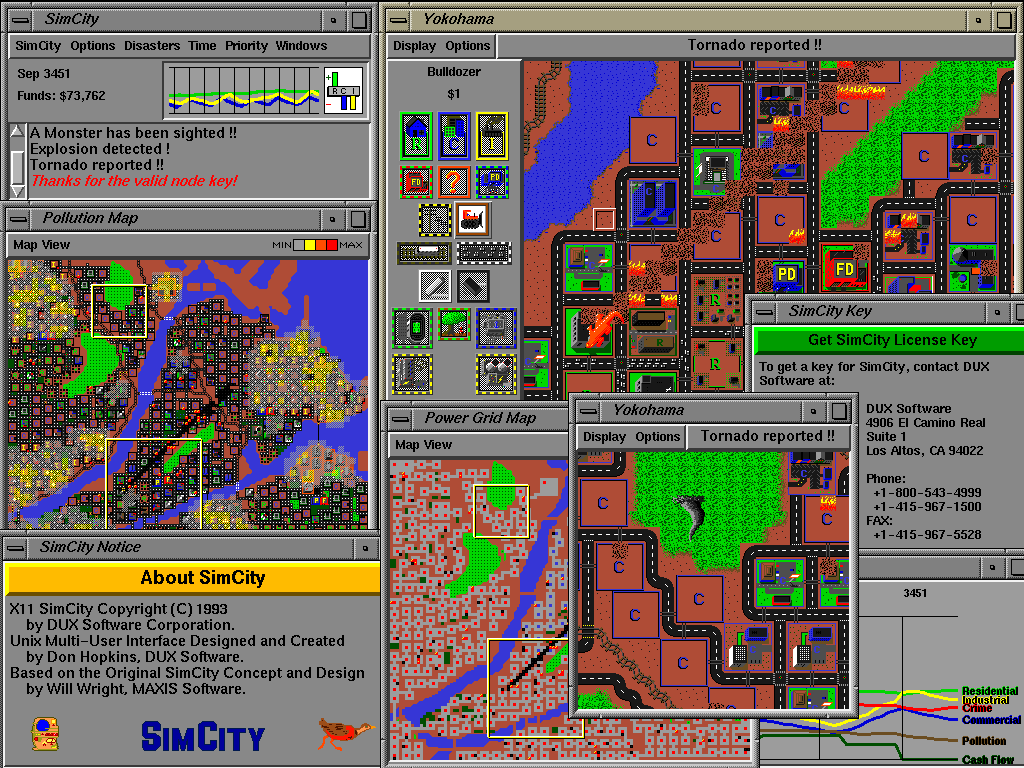
SimCity was was released as opensource project with the code name Metropolis by Don Hopkins. There is not a lot of information available yet, i have skimmed the wiki so far.

Unfortunately, it does not work on Ubuntu Gutsy, this is what I get after installing the x86 build on my 32bit ubuntu install (i had to install yacc and libxpm-dev manually).

$ sudo apt-get install -y yacc libxpm-dev
I can only get to the main menu, it looks like this:


When I run the game the game starts but does not react to any user input:
spliffy@splatter:~/Desktop/micropolis-activity$ sh ./Micropolis -S
Starting Micropolis in /home/spliffy/Desktop/micropolis-activity ...
Welcome to X11 Multi Player Micropolis version 4.0 by Will Wright, Don Hopkins.
Copyright (C) 2002 by Electronic Arts, Maxis. All rights reserved.
sh: Syntax error: Bad fd number
Adding a player on :0.0 ...
Cool, I found the shared memory extension!

Micropolis has been terminated by a signal.
Pick a window -- you're leaving!


spliffy@splatter:~/Desktop/micropolis-activity$ sh ./Micropolis
Starting Micropolis in /home/spliffy/Desktop/micropolis-activity ...
Welcome to X11 Multi Player Micropolis version 4.0 by Will Wright, Don Hopkins.
Copyright (C) 2002 by Electronic Arts, Maxis. All rights reserved.
sh: Syntax error: Bad fd number
Adding a player on :0.0 ...
Cool, I found the shared memory extension!

Micropolis has been terminated by a signal.
Pick a window -- you're leaving!
Does someboy know how to fix this? i am really looking forward to play SimCity :)

Screenshot:


7 Jan 2008

continous read from bash pipe

Pipes are great, I love pipes. This is the reason I love the unix way of live, thousands of small utilities (if you know them) which usually read from /dev/stdin and output to /dev/stdout. So simple and powerfull that it is often overseen (by gui users). Tese examples are for bash:

Creating a pipe

mkfifo /tmp/pipe

Continously reading from a pipe:
while true; do
if [[ ! -p /tmp/pipe ]]; then break; fi
l="`cat /tmp/pipe`";
echo "$l";
done &

Writing to the pipe:
echo -en "a\nb\n" >> /tmp/pipe

bash completion for SQL*Plus -- sweet!

just found the following script from Kris Rice:

------FILE-------
_sqlplus()
{
local cur
COMPREPLY=()
cur=${COMP_WORDS[COMP_CWORD]}
prev=${COMP_WORDS[COMP_CWORD-1]}

if [ $COMP_CWORD -eq 1 ] && [[ "$cur" == -* ]]; then
# return a list of switched
COMPREPLY=( $( compgen -W '-H -V -C -L -M -R -S' -- $cur ) )
elif [[ "$cur" == "/" ]]; then
# only /nolog is possible
COMPREPLY=( $( compgen -W '/nolog' -- $cur ) )
elif [[ "$prev" == "as" ]]; then
# as sysdba sysoper
COMPREPLY=( $( compgen -W 'sysdba sysoper' -- $cur ) )
elif [[ "$prev" == "-R" ]]; then
# added for completness
COMPREPLY=( $( compgen -W '1 2 3' -- $cur ) )
elif [[ "$cur" =~ "@" ]]; then
# if @
base=${cur:1}
COMPREPLY=( ${COMPREPLY[@]:-} $( compgen -f -P "@" -X "$xspec" -- "$base" ) $( compgen -d -P "@" -- "$base" ) )
elif [[ "$prev" =~ "@" ]]; then
# if @
COMPREPLY=( ${COMPREPLY[@]:-} $( compgen -f -P "@" -X "$xspec" -- "$cur" ) $( compgen -d -P "@" -- "$cur" ) )
elif [[ "$*" =~ "/" ]] ;then
# already has a / assume it's the pass
COMPREPLY=
else
#default
_history
fi
}
complete -F _sqlplus $nospace $filenames sqlplus


_history()
{
local cur
cur=${COMP_WORDS[COMP_CWORD]}
COMPREPLY=( $( compgen -W '$( command grep "^sqlplus" ~/.bash_history ) ' -- $cur ) )
}
------FILE-------

5 Jan 2008

oracle 10 on Linux

working with oracle now I wanted a system for experimenting. I find reporting tasks a lot easier to be done from a *nix system as from windows, altough I haven't used oracle so far (experiences from other db systems). Unfortunately my employer mostly favours windows.

So I have decided to install Oracle 10 on a linux system. The first install was tedous, I have decided to download the deb from oracle.com. After finding out there are some apt channels, I have added the following source to /etc/apt/sources.list and installed as follows:

# echo -en "\n# oracle 10\n >> /etc/apt/sources.list"
# echo -en "deb http://oss.oracle.com/debian unstable main non-free\n" >> \
/etc/apt/sources.list
$ wget http://oss.oracle.com/el4/RPM-GPG-KEY-oracle -O- | sudo apt-key add -
$ sudo apt-get update
$ sudo apt-get install -y oracle-xe oracle-xe-client cl-sql-oracle


run the post configuration script:
$ sudo /etc/init.d/oracle-xe configure


make sure the service is running:
$ sudo /etc/init.d/oracle-xe start


then add a new user (make it a dba)
<http://127.0.0.1:8080>

restart the database service:
sudo /etc/init.d/oracle-xe restart


generate a tns file in your home directory, save it unter ~/tnsnames.ora:
<FQDN> =
(DESCRIPTION =
(ADDRESS_LIST =
(ADDRESS =
(COMMUNITY = tcp.world)
(PROTOCOL = TCP)
(Host = 10.0.0.33)
(Port = 1521)
)
)
(CONNECT_DATA = (SID = <HOSTNAME>)
)
)


replace <FQDN> with fulyl qualified domain name and <HOSTNAME> with the actual hostname.

then you should be able to connect to your database. use sqlplus to do so:
$ sqlplus <user>/<pass>@<HOSTNAME>


Now you should have a setup with one database administrator.